
True navigation security isn’t about a better app; it’s about building a layered redundancy system that cannot fail.
- Digital tools are the weakest link, failing due to battery drain, cold temperatures, and inaccurate data.
- Analog skills (map reading, using landmarks) and tools (paper maps, compass) are your ultimate, unbreakable failsafe.
Recommendation: Stop relying on a single device. Start building your personal navigation system with both digital optimization and analog mastery.
The feeling is unmistakable. First, the blue dot on the screen freezes. Then, the screen flickers and dies. You are in the middle of nowhere, the trail ahead is unclear, and your only guide is a dead piece of glass and metal in your hand. In that moment of cold realization, the over-reliance on a single, fragile piece of technology becomes dangerously clear. This is no longer a minor inconvenience; it’s the start of a potential survival situation.
Most advice in this scenario is piecemeal. “You should have downloaded offline maps,” or “Always carry a power bank.” While not wrong, this advice treats the symptoms, not the disease. The core problem is not a dead battery; it’s a systemic failure. You relied on a single system with multiple single points of failure: the battery, the device itself, the app’s data, and the GPS signal. When one fails, the entire system collapses.
The real solution is not to find a better app or a bigger battery. The solution is to stop thinking in terms of single tools and start thinking in terms of layered redundancy. A resilient navigator builds a system where each layer—power, digital, and analog—acts as a failsafe for the one above it. This is not about abandoning technology; it’s about mastering it, understanding its limits, and having the timeless skills to operate effectively when it inevitably fails.
This guide will not give you a simple checklist. It will provide a framework for building that robust, multi-layered system. We will dissect the failures of digital-only navigation, teach you the foundational analog skills that have guided explorers for centuries, show you how to build a truly redundant power strategy, and ultimately, demonstrate how these skills unlock a more profound and secure connection with the wild.
Summary: A Practical Framework for Navigating When Digital Fails
- Why Google Maps Offline Fails You When You Need It Most?
- How to Read a Topographic Map: The Basics for Modern Hikers
- GPS vs. Local Advice: Why Apps Send You Down Dangerous Roads?
- The Power Bank Mistake That Leaves You Stranded on a Hike
- How to Configure Voice Navigation so You Keep Your Eyes on the Road?
- Digital Apps or Paper Notebooks: Which Is Best for Multi-City Trips?
- Which Translation App Works Best Without Data in Rural Areas?
- How to Find Scenic Viewpoints That Aren’t Swarmed by Tour Buses?
Why Google Maps Offline Fails You When You Need It Most?
Your first layer of defense, the offline map, is more fragile than you think. Its primary weakness is its absolute dependence on power. The very act of searching for a signal in remote areas is a significant power drain. In fact, research shows that GPS tracking in poor signal areas can drain up to 38% of a mobile battery as the device desperately tries to lock onto satellites. This creates a vicious cycle: the weaker the signal, the faster your battery dies, and the more you need the map.
Beyond battery life, offline maps have other critical failure points. The downloaded map area might be too small, missing a crucial detour you’re forced to take. The zoom level might be insufficient, rendering a dense network of trails as a single, unreadable line. Data can become corrupted, or an app update can unexpectedly delete your saved maps. Relying on an offline map as your sole backup is like having a spare tire with a slow leak; it provides a false sense of security that will evaporate when put under real stress.
To make this digital layer more robust, you must be meticulous in your preparation. Before you leave, your process should include:
- Downloading maps on a stable Wi-Fi connection to ensure data integrity.
- Selecting a map area at least 20% larger than your planned route to account for unexpected detours.
- Choosing the highest possible zoom levels for your critical areas to capture detailed terrain features.
- Saving maps directly to your device’s internal storage, which is generally faster and more reliable than an SD card.
How to Read a Topographic Map: The Basics for Modern Hikers
When your screen goes dark, the most powerful navigation tool you can possess is not a device, but a skill: terrain literacy. This is the ability to read the three-dimensional world from a two-dimensional sheet of paper. This is the domain of the topographic map and compass. Unlike a digital map that simply shows you a route, a topographic map teaches you the *language of the landscape*.
The key to this language is the contour line. Each brown line on the map connects points of equal elevation. Where the lines are packed tightly together, the terrain is steep. Where they are spread far apart, the ground is flat or gently sloped. A series of concentric circles indicates a peak or hill, while V-shaped lines pointing uphill signify a valley or drainage. Understanding this allows you to visualize the terrain before you even see it, identifying ridges, saddles, and potential hazards.

A compass works in concert with the map. Its purpose is not just to point North. Its primary function is to orient the map to the world around you. By placing the compass on the map and rotating both until the needle aligns with the map’s north, the map becomes a direct, 1:1 representation of your surroundings. A road on your right on the map is now on your right in reality. This fundamental skill, orienting the map, is the bridge between the paper and the physical world, and it functions without any reliance on batteries or satellites.
GPS vs. Local Advice: Why Apps Send You Down Dangerous Roads?
In a navigation failure, two immediate temptations arise: blindly trusting your GPS if it comes back to life, or blindly trusting the first piece of local advice you receive. Both are potentially dangerous. GPS algorithms are optimized for the shortest or fastest route based on available road data, not the safest or most passable. They don’t know that a “road” on the map is a washed-out logging track or a treacherous path suitable only for a modified 4×4. They simply see a connecting line and send you down it.
This digital fallibility is compounded by the inherent inaccuracies of the system. While remarkably precise, small errors can have large consequences over distance. As a baseline, navigation experts warn that even a one-degree error in your bearing results in being nearly 100 feet off course for every mile you travel. In featureless terrain or low visibility, this small error can lead you dangerously far from your intended path.
Local advice can be equally perilous if not properly vetted. A local may give directions based on their memory from years ago, or from the perspective of their high-clearance farm truck. Your rental car may not be able to handle the same route. Therefore, treating local advice as raw intelligence to be verified, not as gospel, is a critical survival skill. Always cross-reference the information with your topographic map. Does the suggested shortcut cross a river without a bridge? Does it traverse a steep mountain pass that could be snowed in? To vet the advice you receive, you must ask targeted questions:
- When was the last time you personally traveled this route?
- What kind of vehicle were you using?
- What were the weather conditions like at that time?
- Is there another local I can ask to confirm this route?
- Are there any official park or forestry service alerts for this area?
The Power Bank Mistake That Leaves You Stranded on a Hike
Carrying a single power bank is the most common and dangerous mistake in power planning. It’s not a backup; it is a single point of failure. If it fails, is lost, gets wet, or was simply never charged, your entire digital layer collapses. True power redundancy is not about having one large battery; it’s about having multiple, diverse sources of power. This is the foundation that supports all your modern tools.
A major factor that is often overlooked is the effect of temperature on battery performance. Lithium-ion batteries, the type found in your phone and most power banks, suffer significant performance degradation in the cold. In fact, scientific studies confirm that cold temperatures can cause as much as a 40% capacity loss in lithium-ion batteries at -20°C. That fully charged power bank might only deliver half its power when you need it most on a cold mountain night. To combat this, you must keep your electronics warm, ideally in an inside pocket close to your body.
A robust power system is a layered system. It should look something like this, with each layer backing up the one before it.
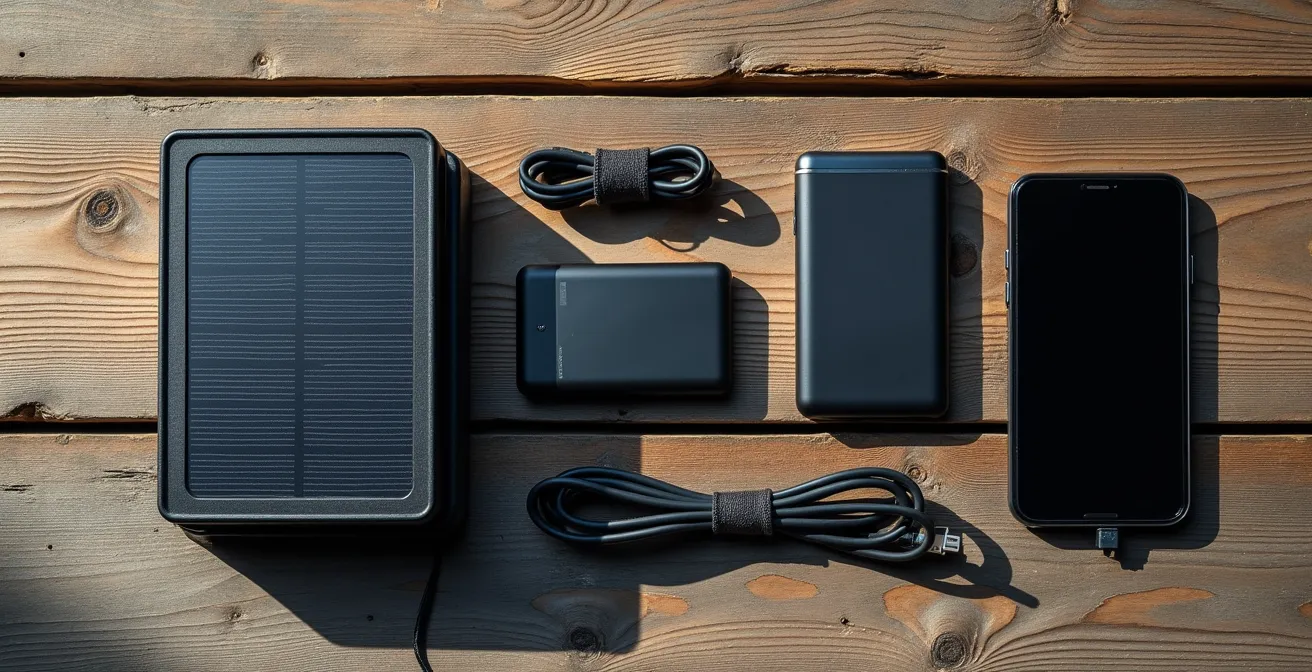
The first layer is your phone’s internal battery, optimized for longevity. The second layer is a small, fully-charged power bank kept warm. The third layer could be a second, larger power bank stored in your pack. The final, ultimate layer might be a non-battery power source, like a small, packable solar panel. This creates a cascade of failsafes, ensuring that the failure of one component does not lead to a total system failure.
How to Configure Voice Navigation so You Keep Your Eyes on the Road?
Even when your digital system is working, it can be a source of distraction and a major power drain. The goal is to optimize this layer for maximum safety and efficiency. The single biggest drain on your device’s battery is the screen. As navigation experts confirm that keeping your screen off is the most effective way to conserve power. This is where voice navigation becomes a critical tool, but only if configured correctly.
Default voice navigation settings are often chatty and inefficient. They provide constant updates that are unnecessary on long, straight sections of road or trail, draining battery and creating auditory fatigue. The key is to switch from a “constant instruction” model to a “decision point” model. You don’t need to be told to “continue straight for 20 miles.” You only need an alert when a turn or critical junction is approaching.
Optimizing your voice navigation involves diving into your app’s settings before you lose signal. Your goal is to make the guidance as minimal and precise as possible. A well-configured system acts like a skilled co-pilot, speaking only when necessary. Your optimization checklist should include:
- Enabling voice guidance only at decision points, not for continuous updates.
- Setting custom waypoint alerts for critical junctions, water sources, or potential hazards you’ve identified on your map.
- Turning off voice prompts entirely during long, straight sections to conserve power.
- Using airplane mode in conjunction with your pre-downloaded offline maps. This stops the phone from searching for a signal and can extend battery life by up to 40%.
Digital Apps or Paper Notebooks: Which Is Best for Multi-City Trips?
The debate between digital and analog extends beyond just maps; it applies to your entire travel information system. For complex trips involving multiple cities, reservation numbers, and addresses, do you rely on a single app or a simple paper notebook? Each has distinct advantages and, more importantly, critical failure points. An over-reliance on a digital-only system for all your vital information creates a catastrophic single point of failure: a dead battery or a lost device can wipe out your entire itinerary.
A paper notebook is immune to power failures, software crashes, and signal loss. It is a robust, simple, and reliable tool. However, it can be bulky, is susceptible to water damage (unless using waterproof paper), and lacks the searchability of a digital app. A hybrid approach is the most resilient strategy. The following table breaks down the core differences in this system.
| Feature | Digital Apps | Paper Maps/Notebooks |
|---|---|---|
| Single Point of Failure | High (battery/device) | Low (physical damage only) |
| Real-time Updates | Yes (with connection) | No |
| Weight | Single device | Multiple items |
| Water Resistance | Device dependent | Can use waterproof options |
A smart navigator uses a hybrid system, leveraging the strengths of both. Use a digital app for its convenience and real-time updates, but maintain an analog failsafe with a small notebook containing the most critical information: the address of your first night’s lodging, key contact numbers, and your primary flight or train details. This wisdom aligns with traditional navigation, which relies on identifying major, hard-to-miss landmarks like rivers or main roads as a baseline. As demonstrated by a comparative analysis of navigation tools, the physical world offers robust anchors that digital tools can supplement, but not fully replace. Your paper notebook acts as your personal “landmark,” a guaranteed point of information you can always return to.
Which Translation App Works Best Without Data in Rural Areas?
In a remote area, the inability to navigate can be compounded by an inability to communicate. While many translation apps offer offline functionality, they still suffer from the same core weakness as navigation apps: they are entirely dependent on a powered, functioning device. When your battery dies, so does your ability to ask for help, water, or directions. Therefore, your communication strategy must also have a robust, non-digital layer.
The ultimate failsafe is an analog translation tool that you create yourself before your trip. This isn’t a complex dictionary; it’s a small, durable, and highly curated set of cards with critical phrases. This physical tool is immune to all forms of technical failure. It cannot run out of battery, lose signal, or crash. It is the most reliable form of communication you can carry in an emergency.
Building this tool requires thinking through a potential worst-case scenario. What information would be absolutely essential to convey if you had no voice and no technology? The focus should be on universal needs and emergency situations. Organize the phrases by urgency to ensure the most critical information is immediately accessible.
Action Plan: Creating an Analog Translation Failsafe
- Pre-write critical phrases on waterproof paper: ‘I am lost’, ‘Need water’, ‘Where is the doctor?’, ‘I need help’.
- Include simple phonetic pronunciations alongside the native script to attempt verbal communication.
- Add simple, universally understood pictographs or drawings next to key phrases (e.g., a water drop, a red cross).
- Laminate the cards or store them in a waterproof bag to protect them from the elements.
- Organize the cards by category for quick access: Emergency, Navigation, and Basic Needs.
Key Takeaways
- A single power bank is not a backup; it’s a single point of failure. True redundancy involves multiple, diverse power sources.
- A topographic map isn’t just a drawing; it’s a language that teaches you to read the terrain itself, a skill that never runs out of battery.
- Always vet local advice and app-based routes against your map and official sources. The “shortest” route can be the most dangerous.
How to Find Scenic Viewpoints That Aren’t Swarmed by Tour Buses?
The skills of analog navigation do more than just provide a safety net; they unlock a more authentic and rewarding travel experience. The very reason that most tourists congregate at the same handful of viewpoints is because they are all following the same digital breadcrumbs—the easily accessible, well-marked locations programmed into Google Maps and tour bus itineraries. By learning to read the landscape, you can find your own way to equally stunning, yet deserted, locations.
Experienced hikers and photographers use topographic maps as a treasure map for solitude. They identify promising viewpoints by looking for specific patterns in the contour lines. A spot with tightly packed contour lines indicates a steep drop-off—the essential ingredient for a dramatic vista. When this is combined with a high elevation point that is not immediately adjacent to a road, you have found a potential hidden gem. Your compass and your ability to read the terrain become your guide to these pristine locations, places where tour buses cannot physically reach and that most people will never see.
This is the principle of the “effort filter.” By choosing viewpoints that require a moderate effort to reach—a 30- to 60-minute hike from the nearest parking area, for instance—you naturally filter out the vast majority of casual tourists. You can enhance this strategy by using satellite imagery to scout for clearings or rock outcroppings that aren’t marked on any tourist map. Visiting popular spots at sunrise, hours before the tour buses begin their rounds, is another effective tactic. The ultimate reward of mastering navigation is not just safety, but the freedom to step off the beaten path and experience the world on your own terms.
The wilderness doesn’t care about your battery percentage. It respects skill and preparation. The blue dot is a convenience, not a right, and a dead battery is a predictable event, not a freak accident. Building your layered navigation system—mastering your power supply, understanding your analog tools, and developing true terrain literacy—is the only real insurance against being left stranded. Start building these skills today, before you need them. Your future self will thank you.